
IPTV is television delivered over a managed network run by a telecom or broadcasting distributor. OTT is video delivered over the open internet by a streaming service that doesn't run the network.
If both can play on the same television, why can one keep working smoothly while the other buffers? The difference isn't necessarily the channel, screen or advertised resolution. It's who controls the delivery path, and where that control ends.
For Canadian households comparing OTT and IPTV, that distinction makes it easier to assess picture quality, household costs and service promises without getting distracted by channel counts.
Table of Contents
- OTT and IPTV Defined and Compared
- How Each Route Delivers Video to Your Screen
- Why Delivery Route Changes Picture Quality and Stability
- Matching the Delivery Model to Your Household
- Common Myths About OTT and IPTV
- Choosing a Service and Checking Renewal Terms
OTT and IPTV Defined and Compared
IPTV, short for Internet Protocol Television, describes a delivery method, not a guarantee about content or quality. OTT, meaning over-the-top, describes services that reach viewers through their ordinary internet connection rather than a managed television distribution network.
The following comparison separates the routes using the CRTC's television distribution definitions, which identify Bell Fibe and TELUS Optik as IPTV while excluding internet-based services such as Netflix, Crave and Club illico.
IPTV and OTT compared by delivery route
| Feature | IPTV | OTT |
|---|---|---|
| Delivery path | Operator-managed network | Open internet connection |
| Who controls the network | Telecom or broadcasting distributor | Streaming company with no control over your access network |
| Canadian examples named by the CRTC | Bell Fibe, TELUS Optik TV | Netflix, Crave, Club illico |
| Channel and content authorization | Distributor authorizes channel carriage under applicable agreements | Set by each service's own licences |
| Main factor in playback quality | Operator network and set-top equipment | Home internet, Wi-Fi, device and bitrate selection |
A distributor-managed service combines the television subscription with a controlled delivery environment. An OTT company controls its application, content preparation and delivery infrastructure, but it doesn't control every connection between its servers and your living room.
That doesn't mean OTT is unregulated or that any internet channel package has distribution rights. Network architecture and content authorization are separate questions. A legitimate service needs the appropriate rights regardless of how it sends the picture.
The television doesn't determine the category
A Smart TV can display managed television through a connected receiver and an OTT programme through an app. Switching inputs or opening another app can change the delivery route without changing the screen.
Likewise, a familiar channel guide doesn't prove that a service operates a managed network. Apps can display live channels, programme schedules and favourites while receiving everything through ordinary broadband.
The distinction was already visible in the CRTC's April 2014 quantitative study: 12% of Canadians subscribed to IPTV, while 39% watched television on demand over the internet. Those findings describe different activities, not interchangeable names for the same subscription.
Buying rule: Identify the delivery route first. Compare price, compatible devices and the channel lineup after that.
Marketing often uses IPTV more loosely to describe television sold over the internet. Treat that label as a starting point, not technical proof. The useful question is whether the company manages the television access network or supplies an app-based stream over your existing internet service.
How Each Route Delivers Video to Your Screen
Follow the signal from the programme source to your device and the difference becomes easier to picture. The paths below are typical architectures, rather than a promise that every provider uses identical equipment.
This diagram shows where the managed-network route separates from open-internet delivery.
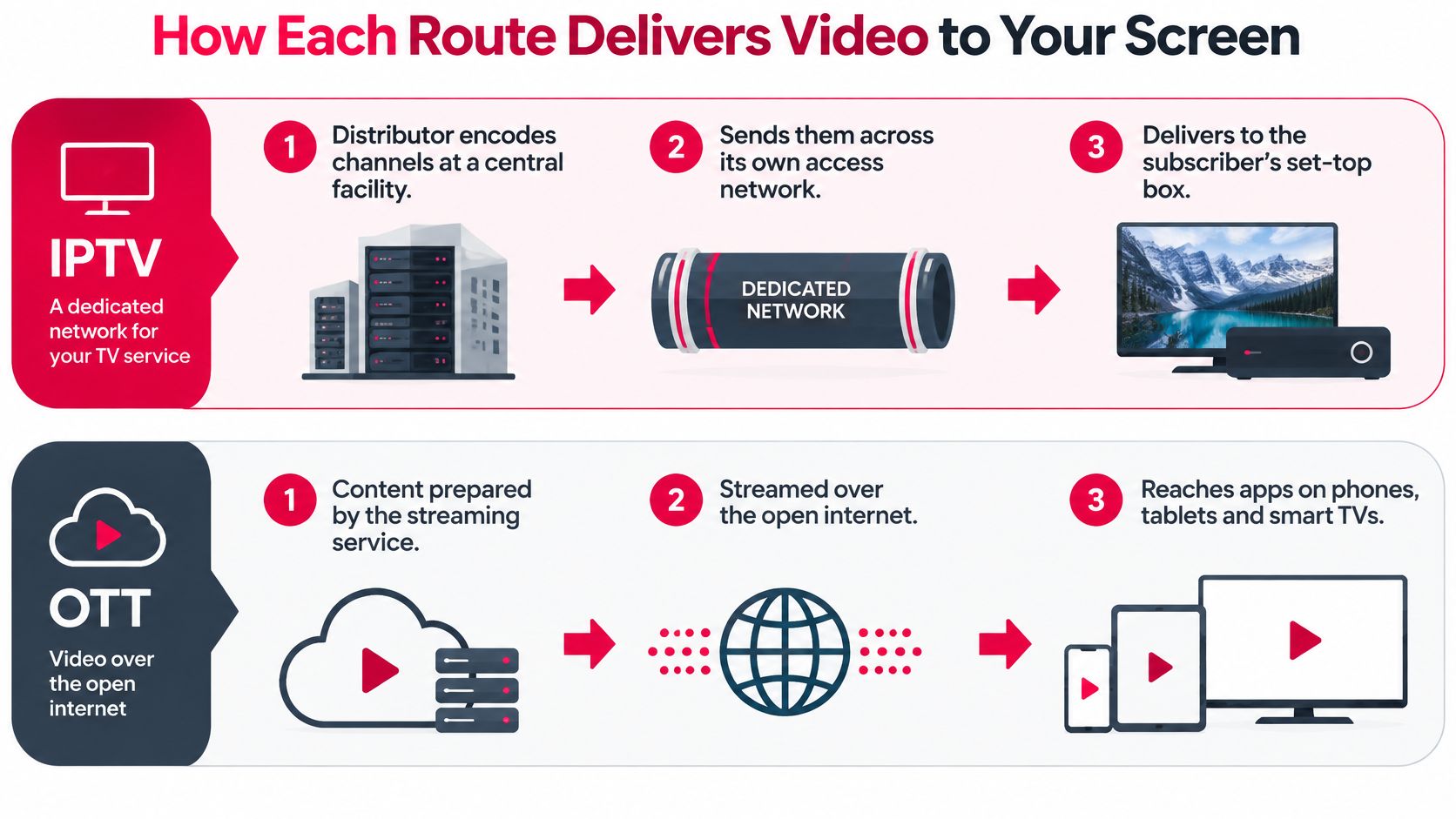
The managed IPTV route
- Channel preparation: The distributor receives and encodes channels at a central facility so subscriber equipment can decode them.
- Network transport: It sends those channels across its controlled access network, where it can manage television traffic.
- Stream reception: A receiver or supported IPTV app receives multicast or managed unicast delivery for the selected channel.
- Programme navigation: An electronic programme guide tells the viewer what's airing and connects a selection to the appropriate stream.
Multicast lets an operator distribute a channel efficiently to multiple viewers. Managed unicast gives a viewer an individual stream within the operator's controlled environment.
The OTT route
- Content preparation: The streaming company encodes a programme into several bitrate versions so different connections and devices can play it.
- Nearby distribution: A content delivery network, or CDN, stores or relays video through edge servers closer to viewers.
- Connection assessment: The app measures available throughput and buffer health to judge which version it can sustain.
- Playback adaptation: The player switches between versions as conditions change, ideally avoiding a stall by reducing quality first.
This switching is adaptive bitrate streaming. A picture that becomes softer during playback may mean the player has successfully avoided stopping, rather than that the television has developed a fault.
Canadian viewing is moving towards this app-based model: the CRTC reports that households consuming content exclusively through streaming platforms increased from 29% in 2024 to 33% in 2025 in its broadcasting monitoring material.
Hardware still needs to match the app. Celmin's best streaming device picks for Canada can help you shortlist equipment, but confirm the service's exact application requirements before buying.
To identify a service's route, check:
- Setup instructions: Does it require the distributor's broadband connection or work through an ordinary internet app?
- Receiver requirements: Is a supplied set-top box compulsory, optional or unsupported?
- Guide behaviour: Does the guide belong to the distributor's system or to an independently installed player?
A box or guide alone isn't conclusive. The access-network requirement is the stronger clue.
Why Delivery Route Changes Picture Quality and Stability
The CRTC's broadband benchmark is 50 Mbps download and 10 Mbps upload, supporting activities that include streaming and downloading video. It's a broadband reference point, not a guarantee that every household can run all its screens at maximum resolution.
Your viewing device receives only the capacity left after other traffic and local network limitations. A speed test beside the router may therefore tell a different story from playback on a television behind several walls.
The illustration highlights that distinction between managed transport and shared household internet.

Read the measurements correctly
The CRTC's broadband measurement report identifies latency of approximately 35–42 milliseconds or lower as generally desirable for activities including video streaming. Latency measures network delay, not download capacity, and it isn't the same as a sports broadcast's total delay behind the action.
For live viewing, responsiveness affects stream requests and channel changes. Encoding, packaging and the player's buffer also contribute to how far playback trails the live event.
Data consumption matters separately: the CRTC's internet services report indicates that 4K streaming can reach approximately 5 GB per hour, equivalent to roughly 120 GB across a continuous 24-hour day; four simultaneous streams multiply that load.
Reference values for stable streaming
| Factor | Reference value | What it affects |
|---|---|---|
| Download speed | 50 Mbps, the CRTC broadband benchmark | Available capacity for HD or 4K before stepping down |
| Upload speed | 10 Mbps, the CRTC broadband benchmark | Two-way requests and other upstream household traffic |
| Latency | About 35–42 ms or lower, the CRTC general guideline | Request responsiveness, channel changes and part of live delivery delay |
| 4K data use | About 5 GB per hour, the CRTC reference | Monthly data allowance and multi-stream consumption |
| Rebuffer ratio | Stall seconds divided by playback seconds | Share of a session affected by buffering |
Rebuffer ratio is more informative than a vague claim that a stream feels unstable. Record startup delay separately so you can distinguish a slow launch from repeated interruptions during a programme.
For a visual companion to these network concepts, use the video below.
Separate transport from the home setup
Providers influence server load distribution, CDN proximity and encoding. At home, Wi-Fi interference, device decoding and competing traffic can still limit playback.
Use our IPTV internet speed requirements guide to assess capacity, and consult mesh Wi-Fi tips from myhalo if coverage is uneven. Mesh can improve coverage, but it can't repair an overloaded internet connection.
Before blaming the provider, check throughput at the television, latency, data-policy limits and the player's buffering behaviour.
Matching the Delivery Model to Your Household
A household wanting live Canadian channels on a telecom account will often find managed IPTV a straightforward fit. The distributor handles the television access network and channel package together, which can simplify responsibility when something stops working.
For a home that mainly watches films and series, OTT offers a different advantage: choose services according to the programmes you watch. Keep a watchlist and cancel overlapping subscriptions when their catalogues no longer justify the bill.
Match the subscription to an ordinary evening in your home, not to the largest catalogue advertised.
Shared screens and different languages
A busy household should size its connection around peak simultaneous viewing, not the number of people registered on an account. Distinguish devices that can sign in from streams allowed to play concurrently, and leave capacity for gaming, video calls and downloads.
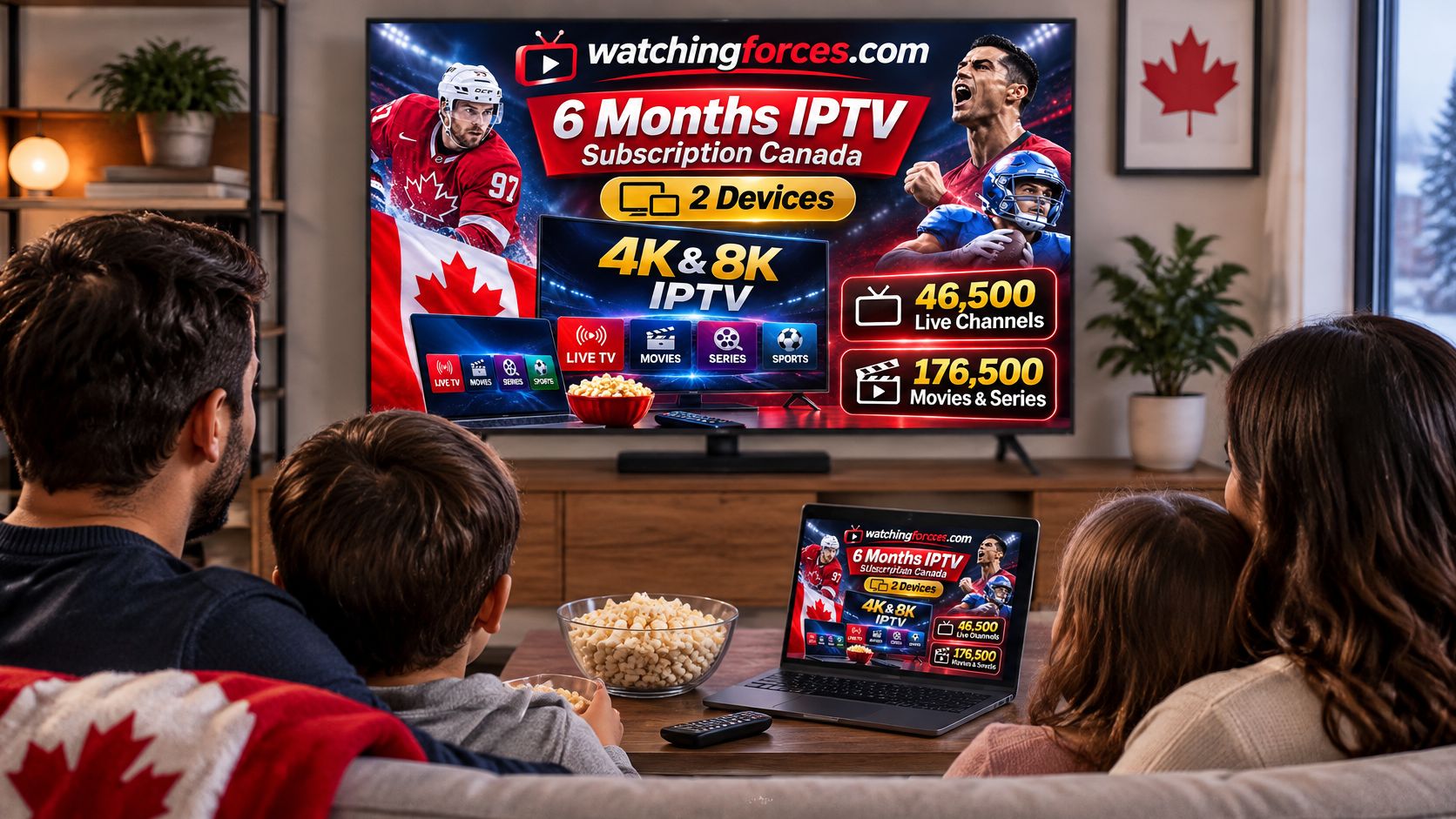
Our 6 Months IPTV Subscription Canada – 2 Devices is a catalogue option for comparing a defined subscription term with a defined device allowance. Confirm compatible applications and the content you need before making that comparison.
The product image identifies the corresponding catalogue option.
Multilingual viewers should compare named channels, languages and programme schedules, rather than headline channel totals. French-language news, Arabic entertainment and English children's programming are different requirements, and a large international list doesn't establish that each is covered.
Sports and device decisions
Sports fans need confirmation that the service is authorized to carry the particular event in their region. Test during evening viewing hours and assess motion clarity, recovery after interruptions and how easily you can find the event.
If you're replacing older hardware, DigiDevice's best 4K TV box for 2026 offers a device-comparison starting point, not proof of compatibility with every player. Firestick, Android TV, Google TV, Samsung and LG equipment can have different app availability.
Use our overview of streaming services in Canada to organise your shortlist. Then answer three questions: How many screens run together? Which languages matter? When do you watch most?
Common Myths About OTT and IPTV
The costliest assumption is that an impressive subscription description removes the need to check what you're buying. A delivery label, a resolution badge and a long channel list each leave important questions unanswered.
Labels and savings aren't guarantees
Myth that IPTV always means a telecom network. In Canadian regulatory terminology, it describes distributor-managed television, but sellers may use the term more broadly. Check whether installation requires the operator's access connection or just an app and your existing broadband.
Myth that OTT is always cheaper. Statistics Canada reports that video and audio subscription prices rose 21.0% from 2019 to 2024, followed by 5.4% year-over-year growth in May 2025. Compare the full household bill, including broadband, premium sports, player licences, equipment and duplicate subscriptions, rather than an isolated advertised fee.
A useful cost check is to write down what you would cancel. Adding another service without removing anything is additional spending, even if its individual price looks attractive.
Quality badges don't establish entitlements
Myth that paying guarantees the highest resolution or uninterrupted viewing. A subscription can make a format available without ensuring every programme, device and connection can deliver it. Check the actual playback information and recorded interruptions rather than relying on a badge.
Myth that a paid package automatically includes Netflix or Disney+. It doesn't establish access to those platforms. Unless an explicit, authorized bundle says otherwise, they require their own subscriptions or entitlements.
Test reliability instead of assuming it
In CRTC consumer research, 7% of Canadians reported a major video-streaming disruption lasting at least 24 hours, while 74% reported no major disruption across telecommunications, television, audio or video services. Those findings don't measure every brief buffering event, but they show why live viewers should plan for possible interruptions.
Run a controlled check:
- Compare connections: Test Ethernet against Wi-Fi on the same device at comparable viewing times.
- Compare demand: Repeat during peak and quieter periods without changing every setting.
- Compare devices: Determine whether the fault follows the account, application or television.
- Keep evidence: Log outage times, startup delay, resolution drops and recovery time.
Send that record to support. It's far more actionable than reporting that everything buffers.
Choosing a Service and Checking Renewal Terms
A service becomes worth comparing when its delivery model, household stream allowance and language coverage match your needs. The remaining decision is contractual: what will you pay, what happens if it doesn't work, and how can you leave?
Read the total payable amount in Canadian dollars (CAD), including applicable taxes and any separate player charge. Our IPTV price comparison guidance for Canada can help distinguish the subscription cost from the wider household bill.
Check the terms before activation
Keep a copy of the terms you accept, especially where an offer has conditions.
- Trial eligibility: Confirm whether a free trial is currently offered, whether you qualify and which features it includes.
- Refund conditions: Check the deadline, exclusions and method for submitting a request.
- Support arrangements: Establish where to report activation problems and playback faults.
- Renewal controls: Identify whether payment repeats automatically and how cancellation is recorded.
British Columbia provides a concrete provincial example. Under its consumer-protection legislation, an automatic-renewal term of 60 days or less is void unless cancellation is permitted before or after renewal without charge or penalty; for longer renewal terms, suppliers must permit cancellation and provide notice 30 to 60 days before renewal, identifying the renewal date, cancellation rights, cancellation instructions and that renewal will occur without a response.
Those are British Columbia rules, not a universal Canadian cancellation policy. Check the rules in your province and distinguish statutory rights from a provider's voluntary terms.
Prepare for setup
Our setup process is to select a preferred channel package, receive login credentials, install an IPTV player application, enter the activation information and begin streaming. Have your device model ready so the installation instructions match your equipment.
Choose on the basis of the delivery route, observable playback and clear terms. A catalogue alone can't answer those questions.
WATCHING FORCES offers internet-based IPTV subscriptions for Canadian viewers, including live television, movies, sports coverage and international entertainment. Visit WATCHING FORCES to compare options and check whether a free trial is currently offered and whether you're eligible. For device setup, subscription or support questions, contact our WhatsApp support team with your device model and household viewing requirements.

No Responses